
What Is DEB ID? How to Generate DEB ID Step by Step
Planning to study through distance education? Learn what a DEB ID is, why it is required, how to generate it using your ABC ID, and how to prepare for admission at Desh Bhagat University Open and Distance Learning (DBU ODL).
Many students want to continue their education while working, managing family responsibilities, or preparing for other career goals. Open and Distance Learning (ODL) helps students study without attending a regular classroom every day. However, before applying for an eligible distance learning programme, students must understand the admission requirements.
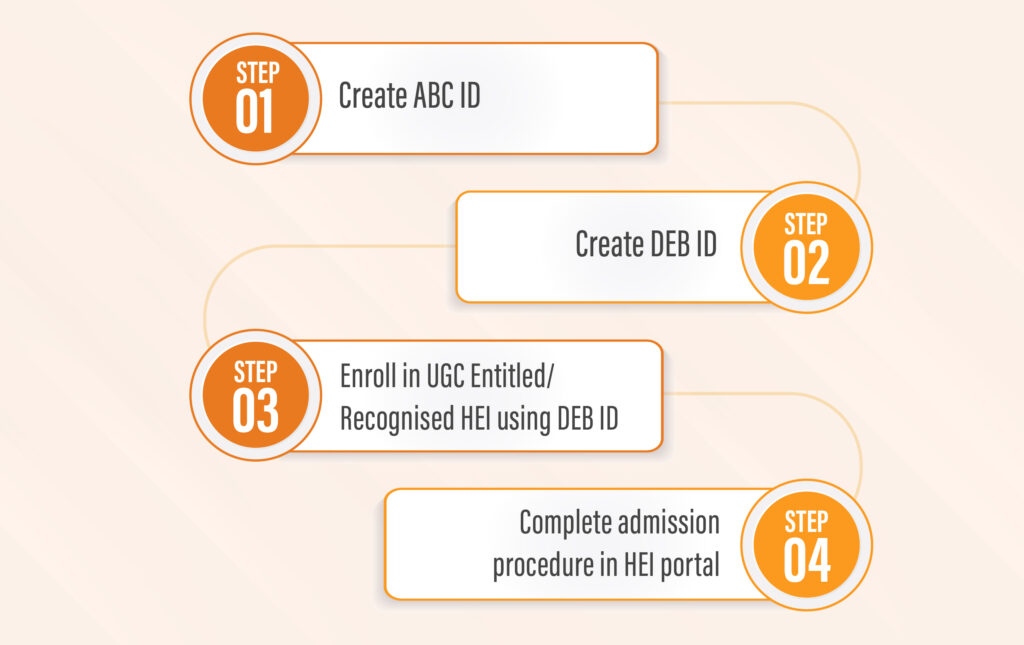
One important requirement is the DEB ID. Students often search online for what is DEB ID and how to generate DEB ID. The process may look confusing at first, especially for students who have never used DigiLocker or the Academic Bank of Credits (ABC) system.
This guide explains the whole process. It covers the meaning of DEB ID, the difference between ABC ID and DEB ID, the steps to create both IDs, common mistakes, and the next steps for applying to DBU ODL.
1. What Is DEB ID?
DEB ID stands for Distance Education Bureau Identification. It is a unique ID that learners must create before taking admission in applicable Open and Distance Learning or online programmes.
The Distance Education Bureau (DEB) is part of the University Grants Commission (UGC). Its role includes regulating and providing information about eligible higher education institutions and their recognised or entitled programmes for distance and online learning.
The DEB ID process helps students check the institution and programme details before they enrol. It connects the student's registration with the UGC-DEB admission system. Students use their Academic Bank of Credits (ABC) ID to create their DEB ID on the official portal.
If you plan to study through distance education, you should understand this requirement before starting your admission application. It is better to generate your ID early so that you have time to correct any information mismatch.
| Point | Details |
|---|---|
| Full name | Distance Education Bureau ID |
| Issued through | Official UGC-DEB student portal |
| Required for | Applicable ODL and online programme admissions |
| Needed before | Completing admission for an eligible programme |
| Linked ID | Academic Bank of Credits (ABC) ID |
| Validity | Designed to remain valid across the learner's ODL/online learning journey, subject to official rules |
The DEB ID is not a degree, marksheet, admission letter, or student roll number. It is an identification requirement in the admission process. You still need to meet the course eligibility rules and complete the university's admission procedure.
2. Why Is DEB ID Required?
The main purpose of DEB ID is to help learners enter eligible distance and online programmes offered by recognised or entitled higher education institutions. It also encourages students to check programme recognition before taking admission.
Here are the main reasons why students should generate a DEB ID before applying.
1. It is part of the admission process
For learners covered by UGC-DEB rules, a valid DEB ID is required for admission to an applicable ODL or online programme. Students should not leave this step until the last moment.
2. It helps students check programme recognition
Not every institution or course is automatically entitled to offer every programme through distance or online mode. Students should check the institution and the specific programme for the relevant academic session on the official UGC-DEB website.
3. It supports informed education choices
Before paying fees, students should understand the mode of study, course requirements, examination rules, and recognition status. The DEB system is one part of this checking process.
4. It helps students prepare their application
Creating the DEB ID in advance gives students time to verify their details, save the ID, and provide it when requested by the university during admission.
3. Difference Between ABC ID and DEB ID
One common question is whether ABC ID and DEB ID are the same. They are connected, but they serve different purposes. Students need an ABC ID before they can generate a DEB ID.
ABC stands for Academic Bank of Credits. It is linked to the academic credit system. DEB ID is the identification required for applicable ODL and online programme admission through the UGC-DEB system.
| Feature | ABC ID | DEB ID |
|---|---|---|
| Full name | Academic Bank of Credits ID | Distance Education Bureau ID |
| Main purpose | Connects a learner with the Academic Bank of Credits system | Identifies a learner for applicable ODL and online admission |
| Where to create it | Through DigiLocker and the official ABC process | Through the UGC-DEB student portal |
| Which ID comes first? | Create this first | Generate this using your ABC ID |
| Is it an admission confirmation? | No | No |
| What should students do? | Check personal and academic details | Check the generated details and save the ID |
For example, if you want to apply for a distance learning programme at DBU ODL and do not have an ABC ID, your first step is to create one. After that, you can use the ABC ID to generate your DEB ID. Once you have it, continue with the university's application process.
4. What Do You Need Before Generating DEB ID?
Before starting the process, keep your basic details ready. This can make the registration easier and help you avoid errors.
| Requirement | Why It Matters |
|---|---|
| ABC ID | This is required to generate your DEB ID. |
| Access to DigiLocker, if needed | You may need it to create your ABC ID. |
| Correct personal details | Your name, date of birth, and other details should match the relevant records. |
| Working mobile number and email | These may be needed for account access, communication, or verification. |
| Internet connection | The registration process takes place online. |
| Access to the official UGC-DEB portal | This is where you generate your DEB ID. |
Use your own correct information and follow the instructions shown on the official portal. Do not share your passwords, OTPs, or sensitive account details with unknown people or unofficial websites.
If you already have an ABC ID, do not create another one without checking the official instructions. First confirm that the existing ID and its linked details are correct.

5. How to Generate DEB ID Step by Step
If you are searching for how to generate DEB ID, follow the steps below. The process is completed through the official UGC-DEB website. The labels or fields may change when the portal is updated, so follow the current instructions shown on the screen.
Step 1: Open the Official UGC-DEB Portal
Visit the official DEB ID registration page using the link below:
Generate DEB ID on the UGC-DEB Portal
Check that the web address belongs to the official UGC-DEB website before entering any personal details.
Step 2: Keep Your ABC ID Ready
Enter the ABC ID requested by the portal. Make sure you use the correct ID and do not confuse it with your Aadhaar number, application number, or university roll number.
If you do not have an ABC ID, create one through DigiLocker first. The next section explains this process.
Step 3: Enter Your Personal Details
Follow the form instructions and enter the information requested, such as your name and date of birth. The portal may also ask for gender, contact details, consent, or other information.
Use the details that match your relevant official records. Check spelling carefully before continuing.
Step 4: Complete the Required Verification
Complete the verification steps shown on the screen. These may include a captcha, consent, or identity-related fields. Follow the current portal instructions rather than relying on old screenshots.
Never give your OTP or account password to someone claiming they can generate the ID for you.
Step 5: Review the Information
Before submitting, review the information displayed on the page. Confirm that the ABC ID and your personal details are correct.
If you find a mismatch, stop and correct the relevant record or follow the official support process. Incorrect details can delay registration or create problems during admission.
Step 6: Submit the Form
After completing the required fields, submit the form using the option shown on the portal. Wait for the result and follow any additional instructions displayed.
Do not assume that the ID has been generated until the portal confirms it or displays the DEB ID.
Step 7: Save Your DEB ID
Once your DEB ID is generated, save the number in a safe place. Keep a copy of the confirmation or screenshot if the portal provides one and it is appropriate to do so.
You may need to provide the ID during the university admission process. Enter it carefully whenever requested.
6. How to Create an ABC ID Before DEB ID Registration
Students who do not already have an ABC ID need to create one before generating their DEB ID. The official UGC-DEB website directs students to use DigiLocker for ABC ID creation.
Follow these steps to create your ABC ID
- Open the official DigiLocker website or its official app.
- Register or sign in by following the current instructions.
- Provide the details required by DigiLocker and complete any verification requested.
- Find the Academic Bank of Credits (ABC) ID service or follow the current official ABC ID creation instructions.
- Complete the process and check that your details are correct.
- Save your ABC ID securely.
- Return to the UGC-DEB portal and use your ABC ID to generate your DEB ID.
The exact screen layout may change, so use the instructions currently displayed by DigiLocker and the relevant official service. If you face a technical issue, use the official help or support options instead of entering your details on an unofficial website.
7. Common Mistakes to Avoid When Generating DEB ID
Students can often avoid delays by checking a few basic details before submitting their forms. The following table lists common problems and what you can do to prevent them.
| Common Mistake | How to Avoid It |
|---|---|
| Entering the wrong ABC ID | Copy the correct ID from your official account and verify it before submission. |
| Name mismatch | Check your linked records and correct any errors through the official process. |
| Incorrect date of birth | Compare your details with the relevant official record before submitting. |
| Trying to create DEB ID without ABC ID | Create your ABC ID first through the official process. |
| Using an unofficial website | Use the official UGC-DEB and DigiLocker websites. |
| Not saving the DEB ID | Keep a secure record of the generated ID for future use. |
| Assuming ID generation means admission | Complete the university's separate application, eligibility checks, and other requirements. |
| Ignoring programme recognition | Check the specific institution and programme for your intended academic session. |
What if your details are incorrect?
If your ABC or APAAR-related details contain an error, check the official support instructions before trying to generate or update your DEB ID. The UGC-DEB portal directs learners with ABC/APAAR discrepancies to the ABC support system or DigiLocker for help with corrections.
You can begin by visiting the official ABC support system. After the relevant details are corrected, review them again before continuing with DEB ID registration or updating your existing details.
For DEB ID technical issues, check the current contact information on the official UGC-DEB student portal.
8. What to Do After Generating DEB ID
Once your DEB ID is ready, you can move to the next stage of your education planning. However, you should complete a few checks before submitting an application.
1. Check the programme and institution
Visit the official UGC-DEB website and verify the institution and the programme for the academic session in which you want to enrol. Do not rely only on advertisements, old webpages, or information shared by third parties.
2. Review course eligibility
Check the qualification required for your chosen programme. Undergraduate and postgraduate courses have different eligibility conditions. You should also check any minimum marks, subject requirements, or other conditions listed by the university.
3. Prepare your documents
Keep the documents required for the university application ready. Depending on the programme and application process, these may include previous academic marksheets, certificates, a photograph, identity details, contact information, and your DEB ID.
4. Complete the university application
Fill out the application form using correct details. Upload the requested documents, follow the fee instructions, and check for any confirmation message or additional requirements. Admission is subject to the university's eligibility checks and applicable rules.
5. Keep copies of important information
Save your DEB ID, application number, payment receipt, and admission confirmation securely. These records can help you follow up if you need assistance later.
9. DEB ID and Admission at DBU ODL
Desh Bhagat University Open and Distance Learning (DBU ODL) provides an option for students who want to pursue eligible higher education programmes through distance learning. Before applying, students should understand the programme details, eligibility criteria, admission requirements, and the relevant recognition status.
If you are planning to apply to DBU ODL, generate your DEB ID first if you are required to do so. Then review the university's current programme information and follow the admission instructions for your selected course.
Suggested steps for DBU ODL applicants
| Step | What You Should Do |
|---|---|
| 1. Choose a programme | Review the courses currently offered by DBU ODL. |
| 2. Check eligibility | Confirm that you meet the course-specific academic requirements. |
| 3. Generate DEB ID | Complete the official UGC-DEB registration process using your ABC ID, where required. |
| 4. Check recognition | Verify the relevant institution and programme status for your admission session on the UGC-DEB website. |
| 5. Apply online | visit the Apply Now page and follow its current application instructions. |
| 6. Submit documents | Provide the requested academic documents, personal details, and DEB ID. |
| 7. Complete admission | Follow the university's verification, fee payment, and confirmation process. |
You can review the admission procedure.
Planning to Study Through Distance Learning?
Explore the programmes offered by DBU ODL and review the current admission requirements before applying.
Explore DBU ODL Apply NowFor admission-related questions, you can contact DBU ODL using the contact information listed on its official website.
- Phone: +91 74670 99999
- Email: admissions@dbuodl.in
Programme availability and recognition can change by session. Always confirm the latest details with the university and UGC-DEB before making an admission decision.
Conclusion
Understanding what is DEB ID and how to generate DEB ID is an important first step for students planning to study through eligible distance or online programmes. The process begins with an ABC ID, which can be created through DigiLocker, followed by registration on the official UGC-DEB portal.
Always check your details carefully, save your DEB ID, and verify the recognition status of your chosen institution and programme for the relevant academic session. After completing these steps, follow the university's application and admission instructions.
If you are considering distance learning at Desh Bhagat University, visit DBU ODL to explore available programmes and review the current admission procedure.
10. Frequently Asked Questions About DEB ID
1. What is DEB ID?
DEB ID is a unique identification number required for eligible learners seeking admission to Open and Distance Learning or online programmes under UGC-DEB rules.
2. How to generate DEB ID?
Visit the official UGC-DEB student portal, use your ABC ID, enter the required details, complete the verification steps, and submit the form.
3. Is ABC ID required to generate DEB ID?
Yes. The official UGC-DEB process requires an ABC ID to generate a DEB ID.
4. How can I create an ABC ID?
You can create an ABC ID through DigiLocker by following the current official instructions and completing the required verification.
5. Is DEB ID compulsory for distance education admission?
It is mandatory for learners covered by the applicable UGC-DEB requirements. Check the current official rules for your admission category.
6. Is DEB ID the same as an admission number?
No. DEB ID is used in the UGC-DEB admission process. A university may issue a separate application number, enrolment number, or roll number.
7. Does generating DEB ID confirm my admission?
No. You must still meet the eligibility criteria, apply to the university, submit documents, and complete the admission process.
8. What should I do if my details are incorrect?
Check the linked ABC or APAAR records and use the official ABC support or DigiLocker process to correct errors before continuing.
9. Can I use my DEB ID when applying to DBU ODL?
If required for your application, provide your generated DEB ID and follow the current instructions on the official DBU ODL website.
10. Where can I generate my DEB ID online?
You can generate it through the official UGC-DEB portal at deb.ugc.ac.in/StudentDEBID.